FIELD SERVICE SOFTWARE FOR SMALL CREWS

Keep doing the work. Jefe keeps the day on track.

Jefe brings what needs attention to the top and keeps every request, Quote, job, invoice, and payment connected—while working alongside the tools your crew already uses.

  • No credit card
  • English and Spanish
  • Mobile app + desktop workspace

BUILT FOR SMALL SERVICE CREWS

The way your crew already works, only more organized and simple.

Keep your current tools. Let Jefe organize the work happening around them.

Stay ahead of the day

Jefe brings time-sensitive scheduling, billing, follow-up, and messages into one queue.

Share Job Details

  • Send job details to helpers—even if they don’t use Jefe.
  • Collaborate more easily with crew members who use Jefe.

Communicate in English or Spanish

  • Manage customer communication in English while using Jefe in Spanish—or vice versa.
  • Write job details and record voice notes in English or Spanish, regardless of your app language.

Plan smarter without tracking your crew

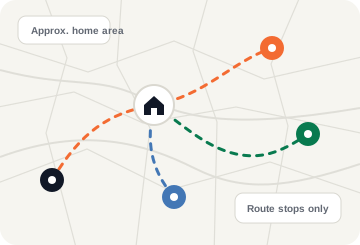
Create route-aware schedules around crew home areas—even when a crew member keeps their address private.

Learn more about scheduling

Start with one real job.

Use Jefe alongside the tools you already have, then move more over when you’re ready.

  • 30 days freeNo card required
  • English + SpanishIn one mobile app
  • No Jefe accountFor shared helper links

SWITCH WITHOUT STARTING OVER

Your history should not be the price of switching.

Start using Jefe alongside the system you use today. Supported files are staged in a review workspace; no data moves into your live records until an owner or manager approves the import. Beta and assisted paths are clearly labeled.

Ask about your export
No big-bang cutover. Run one real job in Jefe first. Keep the old system available while you verify what was staged.
SELF-SERVE BETA

Jobber

Review and import Products & Services, clients, jobs, and Quotes.

Ask us first: Invoice history and full recurring-work migration are not self-serve.

SELF-SERVE BETA

Housecall Pro

Review and import Price Book, customer, and job exports.

Ask us first: Grouped or separate invoice and payment history needs manual review and is not self-serve.

SELF-SERVE + ASSISTED

Spreadsheets

Price Book CSV is available through self-serve import.

Assisted: Customer, job, and job-linked invoice sheets need assisted setup and are not self-serve.

YOU STAY IN CONTROL

You decide when it goes live.

  1. Upload supported filesChoose the source and files for a supported path.
  2. Review before commitCheck mappings, row issues, and the staged preview.
  3. Commit when it is readyAn owner or manager approves the import into live records.

Beta coverage varies by export. Some fields or historical records may need manual follow-up.

ONE JOB, CONNECTED RECORDS

From first request to final payment, with the details connected.

Start with a request, a Quote, or work you already agreed to do. Jefe keeps shared customer, job, crew, invoice, and payment details together as you move forward.

  1. Request
  2. Quote
  3. Schedule
  4. Do the work
  5. Invoice
  6. Payment
CONNECTED WORKFLOW

Door repair

Taylor G. · Austin, TX

In progress
  • Request capturedPhotos and details saved
  • Quote approved$640 · customer approved
  • Crew scheduledAlex G. · Thursday, 10:00
  • Invoice readyReady to review and send
NEXT ACTIONReview and send the invoice

START WHERE YOU ARE

Use only the steps this job needs.

A repeat customer can start at scheduling. Another job can start with photos and a Quote. Jefe keeps the shared details together as you move forward.

  • Already agreed? Schedule the job.
  • Needs approval? Send a Quote.
  • Work already done? Invoice and collect.

YOUR DAY, PRIORITIZED

Jefe brings the next action to the top.

On Home, owners and managers see a prioritized list of what needs attention, what is holding up payment, and what can disrupt the schedule.

JEFE.Today
Owner and manager view
NEEDS ATTENTION

Priority actions

  • Quote follow-up dueDoor repair · Taylor G.
  • Customer schedule choice to reviewGutter install · tomorrow
MONEY WAITING

Payment actions

  • Invoice ready to sendDoor repair
  • Reported payment to reviewGutter cleaning
SCHEDULE RISK

Schedule actions

  • Appointment reminder dueHVAC tune-up · 1:30
  • Today’s visit needs crewFence job · South Austin
Messages stay in your hands.You queue each SMS draft; Jefe brings it back when it is due. You review and send from your phone.

THE FULL JEFE TOOLKIT

Everything you need to run the work.

Use the tools that fit your workflow today. Add more as your business needs them—without forcing every job through the same steps.

  • Mobile + desktop
  • English + Spanish
  • Owner + manager + crew

Get and organize work

  • Public request forms with customer details and photos.
  • Customers, contacts, properties, and service history.
  • Jobs and visits with notes, photos, receipts, materials, expenses, and costs.
  • Multiple Price Books for reusable services, labor, materials, taxes, and warranties.
  • Start from a request, Quote, recurring template, or job.

Schedule the day

  • Mobile and desktop schedules with crew filters and conflict warnings.
  • Recurring-work templates for common service frequencies.
  • Bulk scheduling with a review before jobs are created.
  • Route-aware recommendations that you review and accept.
  • Crew home locations can improve routes while hidden addresses stay private from owners—without continuous GPS tracking.
  • Appointment links for confirmations, requested changes, and eligible self-scheduling.

Coordinate crew and helpers

  • One mobile app with owner, manager, and crew views.
  • Crew invitations, access management, and role-based permissions for documents, pricing, and payment information.
  • Availability, assignments, daily work, route maps, and visit progress.
  • Secure job links for helpers who do not use Jefe.
  • Activity history records status, document, note, and payment actions by teammate.

Communicate naturally

  • English and Spanish across the app, documents, and message templates.
  • Voice notes in English or Spanish keep the original audio with requests, jobs, and visits.
  • Voice actions let you review a command before preparing a Quote or invoice, completing a job, recording a payment, or adding a note.
  • Queue SMS drafts, then edit, snooze, review, and send from your phone.
  • User-reviewed handoffs for appointments, on-my-way updates, Quotes, invoices, payments, and follow-up.
  • Communication history stays connected to the job.

Quote, invoice, and get paid

  • Quotes with Price Book items, deposits, images, online approval, revision history, renewal reminders, and follow-up.
  • Invoices with due dates, preview, send, void, and follow-up.
  • Online invoice payments through Jefe Payments, with saved-card and autopay setup and recovery where enabled.
  • Get Paid keeps ready, overdue, reported, and paid work visible.
  • Record cash, Zelle, Venmo, Cash App, ACH, check, and other payments.
  • Tap to Pay on eligible devices, powered by Stripe Terminal.
  • Prepare a user-reviewed Google review request when your review link is configured.

Run the business

  • Today, To Do, and Needs Attention queues surface the next action.
  • Reports for revenue, payments, expenses, margin, pipeline, and crew.
  • Mobile-first daily operations plus an owner and manager web workspace.
  • Reviewed Beta and assisted import paths for Jobber, Housecall Pro, and supported spreadsheets.
  • Referral links and referral-status tracking.
  • Business and property country settings apply country-based currency rules to document math.
  • Built-in help, feedback, and comfortable text sizing.

Pricing

Simple pricing for small teams.

Jefe does not charge by module. Smart scheduling, To Do, Get Paid, quotes, invoices, photos, customers, crew, and English/Spanish support are included. Only high-usage communication features may have variable charges.

Jefe Solo

For an owner running solo

$39/mo

2 total members: owner + one manager/admin.

  • All core features
  • Schedule, To Do, and Get Paid
  • Quotes, invoices, and reminders included
Start now

Jefe Micro is built for teams up to 5 total members. There is no purchase inside the mobile app.

Get started

Run your next job in Jefe.

Create your company and take one real job from Quote through payment. No card is required to start.

Your trial starts when you create your company

Use your email to create or open your owner workspace.
Need help? Email support@getjefe.app.
Jefe prepares messages for you to review and send from your phone.